🌍 SSJ Geo Tag Generator
Inject precise coordinates & metadata into your images.
No images selected
🛠️ Metadata Settings
Geo Tag Generator: Boost Local SEO by Adding Location Metadata to Images
In the digital landscape, location is everything. Whether you are a local business owner trying to dominate Google Maps or a photographer documenting a journey, your images need to speak the language of search engines. Standard photos often lack the hidden data required to rank in local searches. This is where the Geo Tag Generator by SSJ Tools comes in—a powerful, browser-based solution designed to inject precise latitude, longitude, and metadata into your images instantly.
What is the SSJ Geo Tag Generator?
The SSJ Geo Tag Generator is a specialized image SEO tool that allows users to embed geographic information directly into the EXIF (Exchangeable Image File Format) data of a photo. Unlike basic editors, this tool provides an interactive map interface, allowing you to visually select a location and “burn” those coordinates into your files. It’s designed for efficiency, supporting batch processing so you can optimize dozens of photos for local SEO in seconds.
Key Features of Our Geotagging Tool
Interactive Dark-Mode Map: Use the integrated Leaflet map to pinpoint any location worldwide with surgical precision.
Comprehensive Metadata Support: Go beyond just coordinates. Add an image title, author name, and custom comments/descriptions.
Batch Processing: Upload multiple images at once and apply the same location data to the entire set.
Privacy-Focused Processing: All image processing happens locally in your browser. Your photos are never uploaded to our servers, ensuring 100% data privacy.
Bulk Download: Once tagged, you can download your optimized images individually or as a single, organized ZIP bundle.
Universal Compatibility: Works seamlessly with JPG and JPEG formats, the gold standard for web and mobile photography.
How to Use the Geo Tag Generator (Step-by-Step)
Optimizing your photos with our online image tagger is straightforward. Follow these steps to get started:
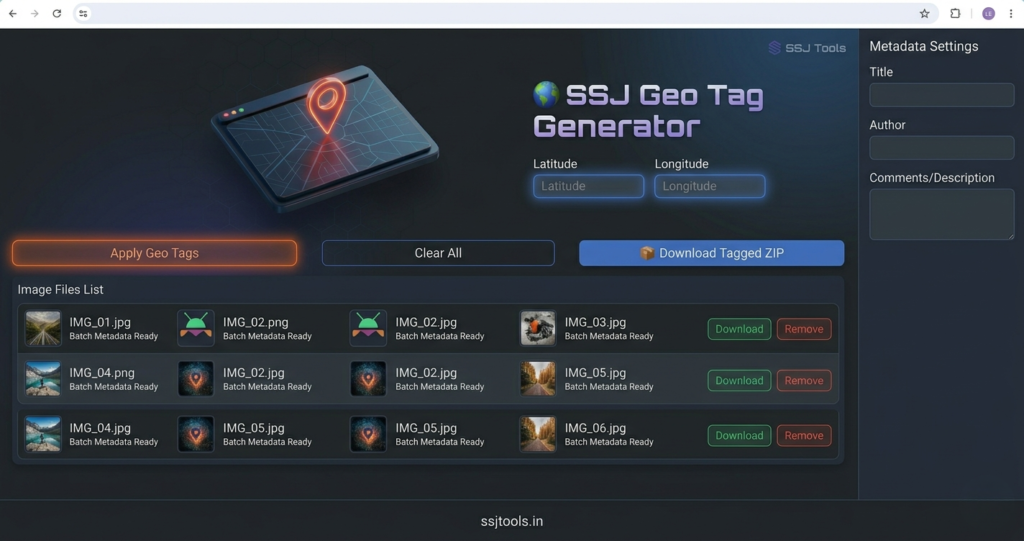
Upload Your Images: Click the “Drop or click to select images” box or drag your files directly into the interface.
Select Your Location: Navigate the interactive map and click on the specific area you want to tag. The latitude and longitude fields will update automatically.
Enter Metadata: Fill in the “Metadata Settings” on the right sidebar. Add a relevant Title, Author Name, and Description (Comments) to provide more context to search engines.
Apply Geo Tags: Click the orange “Apply Geo Tags” button. The tool will process your images and generate preview links in the file list.
Download: You can download images one by one or click “Download Tagged ZIP” to save the entire batch to your device.
Why Choose SSJ Tools for Geotagging?
While there are many geotagging tools available, SSJ Tools offers a unique blend of speed and depth. Most free tools only allow you to change coordinates; we allow you to edit the “Artist” and “Image Description” tags simultaneously. This creates a “complete” metadata profile that signals high quality and relevance to search crawlers like Google and Bing.
Use Cases for Geotagging Images
Local SEO for Small Businesses: A plumber in Chicago can geotag photos of their completed work to help their website appear in “plumber near me” searches.
Real Estate Listings: Agents can add precise coordinates to property photos to ensure they appear correctly on real estate portals and maps.
Travel Bloggers: Document the exact location of hidden gems and tourist spots to make your blog posts more authoritative.
E-commerce: Brands with physical stores can tag product images with store locations to drive foot traffic.
The SEO Benefits of Geotagging Photos
Search engines use metadata to understand the context of an image. By using a photo geotagging tool, you are providing “structured” proof of your location.
Improved Local Rankings: Geotagged images help confirm your business’s physical location, which is a key ranking factor for the Google Map Pack.
Increased Image Search Visibility: Photos with rich EXIF data are more likely to appear in “Images” search results for location-specific queries.
Enhanced Trust & Authority: Search engines view images with complete metadata (Author, Title, GPS) as more professional and reliable than “empty” files.

Tips for Best Results
Use Relevant Titles: Don’t just tag the location. In the “Image Title” field, use keywords like “Best Italian Restaurant in Brooklyn” for maximum SEO impact.
Optimize File Size First: Ensure your images are compressed for the web before geotagging to maintain fast page load speeds.
Be Specific: If you have multiple store locations, tag each set of photos with the exact coordinates of the specific branch they represent.
Frequently Asked Questions
1. Is it free to geotag photos online with this tool?
Yes, the SSJ Geo Tag Generator is completely free to use with no hidden costs or daily limits.
2. Does geotagging an image change its quality?
No. Our tool modifies the metadata (EXIF data) of the file without re-compressing the actual image pixels, so your photo quality remains identical.
3. Will this tool work on my smartphone?
Absolutely. Our tool is mobile-responsive and works on any modern web browser on Android or iOS.
4. Can I add location data to PNG files?
The tool primarily targets JPG and JPEG formats, as these are the industry standard for EXIF and GPS metadata storage.
5. Why do I need to add an Author and Title?
While GPS coordinates are vital for maps, the Author and Title fields help search engines understand who created the content and what the image represents, further boosting your SEO.
Conclusion
Mastering local SEO requires more than just keywords in your text; it requires a holistic approach to every asset on your page. By using the Geo Tag Generator at ssjtools.in, you ensure that every image on your website works as a beacon for local search traffic. Start optimizing your gallery today and put your business on the map—literally.