Convert Image to PDF Online with Ease
Introduction
In today’s digital landscape, the need to streamline information is paramount. Whether you’re a student compiling research, a professional organizing project milestones, or a creative showcasing your portfolio, managing multiple image files can be chaotic. The problem often lies in distributing or archiving disparate photos, screenshots, and scans. The solution? A centralized, universally accepted document format. That’s where SSJ Tools’ Image to PDF Converter steps in, transforming your multiple image files into a single, cohesive, and professional PDF file instantly.
What is the SSJ Tools Image to PDF Converter?
The SSJ Tools Image to PDF Converter is a free, powerful online utility designed for seamless document creation. This intuitive online PDF maker allows users to efficiently convert image to PDF formats without any software installation. Developed by Er. Satendra at SSJ Developer, this tool is optimized for simplicity and speed, making it an essential resource for anybody needing a quick and reliable photo to PDF converter for personal or professional use.
Key Features of Our Image to PDF Converter
Our tool is packed with features designed to simplify your workflow:
Multi-Format Support: Convert various image formats including JPG to PDF converter and PNG to PDF converter functionalities, ensuring versatility for all your source files.
Merge Images to PDF: Easily merge images to PDF into a single document, perfect for compiling reports, portfolios, or photo albums.
Fast, Client-Side Processing: Built on modern JavaScript technologies (like jsPDF), the conversion happens entirely within your browser, ensuring incredible speed and unmatched privacy—your files never leave your device.
Batch Image Handling: Select and multiple image to PDF files simultaneously. Efficiently manage your conversion queue with a clear status logger.
User-Friendly Interface: Experience a sleek, modern UI with features like batch preview and process indicators, making document creation straightforward for everyone.
How to Use This Tool: Step-by-Step
Our picture to PDF converter is designed for extreme ease of use. Just follow these simple steps:
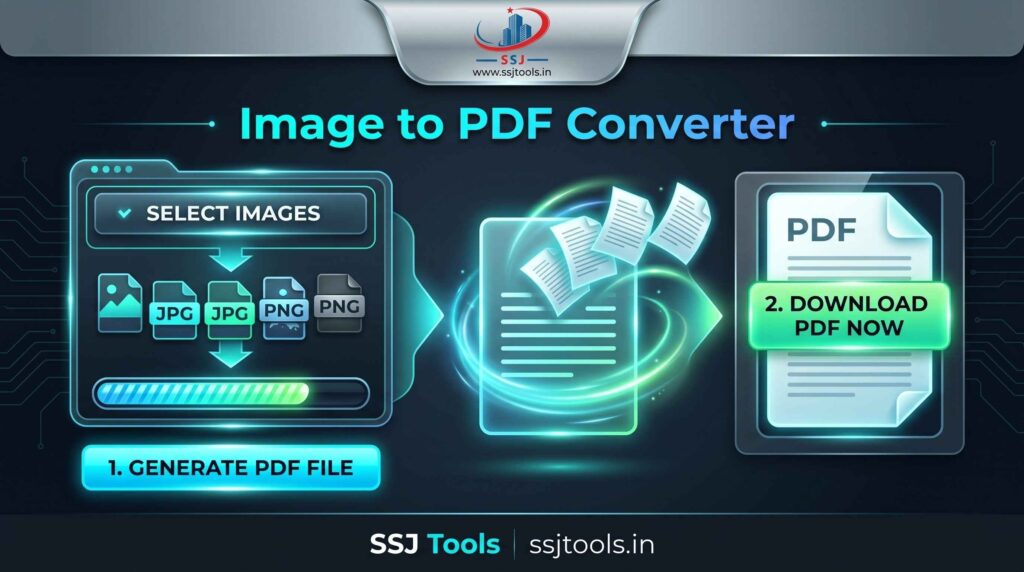
Select Images: Look for the “Media Queue” section and click the Select Images button. Choose one or more images from your device. Our tool supports multiple selections.
Preview Your Selection: The Batch Preview area will instantly display thumbnails of your chosen images. A system log will confirm how many images are in your queue.
Generate PDF File: Click the large, neon 1. Generate PDF File button. This initiates the conversion process, and you can follow the progress in the status section.
Download Your PDF: Once the synthesis is complete, a new “DOCUMENT READY” section appears. Click the 2. Download PDF Now button to save your compiled PDF.
Why Choose SSJ Tools for Your Conversion Needs?
With numerous options available, here’s why our free image to PDF converter stands out:
100% Free and Unrestricted: Enjoy unlimited conversions without hidden fees, watermarks, or account creation requirements.
Complete Privacy: We prioritize your security. Since the conversion is processed client-side (in your browser using jsPDF), your sensitive documents and private photos are never uploaded to our servers.
Cross-Platform Compatibility: Whether you need an online image to PDF converter for mobile or a robust tool for desktop, SSJ Tools works seamlessly across all devices and browsers.
Streamlined Efficiency: No complicated settings or configurations. Focus on quickly creating the document you need, when you need it, using this straightforward PDF document creator.
Common Use Cases
The application for a photo to PDF converter is vast. Here are some common scenarios:
Academic & Study Guides: Students can quickly merge photographs of textbook pages, handwritten notes, or whiteboard diagrams into a single, organized study guide.
Business Reports & Presentations: Professionals can combine screenshots, charts, and product images into professional PDFs for distribution or archiving.
Creative Portfolios: Artists and designers can instantly compile their digital artwork, sketches, and prototypes into shareable portfolios or client proposals using this free PDF creator.
Personal Document Management: Home users can efficiently manage JPG PNG to PDF conversions of scanned receipts, invoices, or personal identification documents for secure, organized storage.
SEO Benefits: Enhanced Document Control
For businesses and content creators, converting images to PDF offers distinct SEO advantages. PDFs are inherently better for containing structured text and descriptive metadata compared to raw image files. By compiling related visual content into an optimized PDF, you create a more complete asset that search engines can easily parse and index. This can enhance the visibility of your compiled resources and establish greater authority within your niche.
Tips for Best Results
For the highest-quality PDF generation:
Check Resolution: Ensure your input images are of sufficient quality before starting the picture to PDF tool process, as final PDF quality is directly tied to source image resolution.
Optimize File Names: Name your source images logically before uploading. While our tool processes them efficiently, having clear source names simplifies organization.
Review Your Queue: Always check the Batch Preview to ensure all necessary images are included and in the desired order (based on your selection sequence) before clicking ‘Generate’.
Frequently Asked Questions (FAQs)
Q1: What image formats can I convert?
SSJ Tools’ converter supports popular image formats. You can effortlessly use it as both a JPG to PDF converter and a PNG to PDF converter to merge your files into single documents.
Q2: Is there a limit on how many images I can merge?
Our tool is designed for multiple image to PDF conversion. While there is no hard restriction imposed, performance and file size might vary depending on your browser and device capabilities when processing exceptionally large image queues.
Q3: Are my images safe and private?
Absolutely. All processing happens entirely within your web browser. Your images and the final PDF are never uploaded to or stored on any server, ensuring complete confidentiality.
Q4: Can I use this on my smartphone or tablet?
Yes, this online PDF creator is fully responsive. You can use it as a convenient image to PDF converter online directly from your mobile device or tablet.
Q5: Is this tool truly free, or are there hidden fees?
SSJ Tools’ photo to PDF converter is 100% free with no watermarks or hidden costs. It’s built to provide a straightforward, accessible solution for all your conversion needs.
Conclusion
Master your digital workflow and secure your information with SSJ Tools’ Image to PDF Converter. Don’t let scattered images complicate your day. Experience the convenience of this fast, secure, and entirely free image to PDF converter. Click below to start converting your images and take control of your document management today!