🗜️ Image Compressor
Reduce file size without sacrificing professional clarity.
Awaiting input stream…
Compressed output will appear here
Efficient Online Image Compressor: Optimize Your Images Instantly
Images are the lifeblood of modern websites, making them visually engaging and communicative. However, high-quality, uncompressed images often come with a heavy cost: sluggish website load times. This slow performance frustrates users and can severely damage your SEO rankings. In the digital age, speed is paramount, and bulky image files are a major bottleneck.
Whether you’re a photographer looking to showcase your portfolio, a blogger adding visuals to your articles, or a developer aiming for a lightning-fast user interface, the struggle with file size is real. How do you maintain professional-grade image clarity while drastically reducing file size?
SSJ Tools presents the ultimate image compression tool free to use, designed specifically to address this challenge. Our online image compressor empowers you to instantly reduce picture image sizes without compromising their visual integrity. Let’s delve into what makes this tool essential for anyone who works with web graphics.
What is the SSJ Tools Image Compressor?
Our tool is a powerful online image compression tool designed to significantly shrink the file size of your JPEG and other supported images. It uses a sophisticated lossy compression online algorithm to strip unnecessary data from your photos, striking a perfect balance between file size reduction and visual fidelity.
Essentially, it functions as a comprehensive photo compressor website, removing the need for complex, resource-heavy image compressor software download. Everything happens right in your browser, securely and efficiently. We built this photo compression tool to be intuitive and fast, prioritizing both user experience and technical efficiency.

Key Features of Our Image Compressor Tool
Based on the core mechanics and interface of our tool, here are the key features that set it apart:
Customizable Compression Level: Unlike basic tools, we offer a dedicated “Compression Level” slider (from 10% to 100%). This gives you granular control, allowing you to prioritize the smallest size or the highest quality, depending on your specific needs.
Intelligent JPEG Optimization: Our underlying jpeg compressor freeware engine is specifically tuned for JPEGs, employing advanced bit-rate control to ensure optimal optimization.
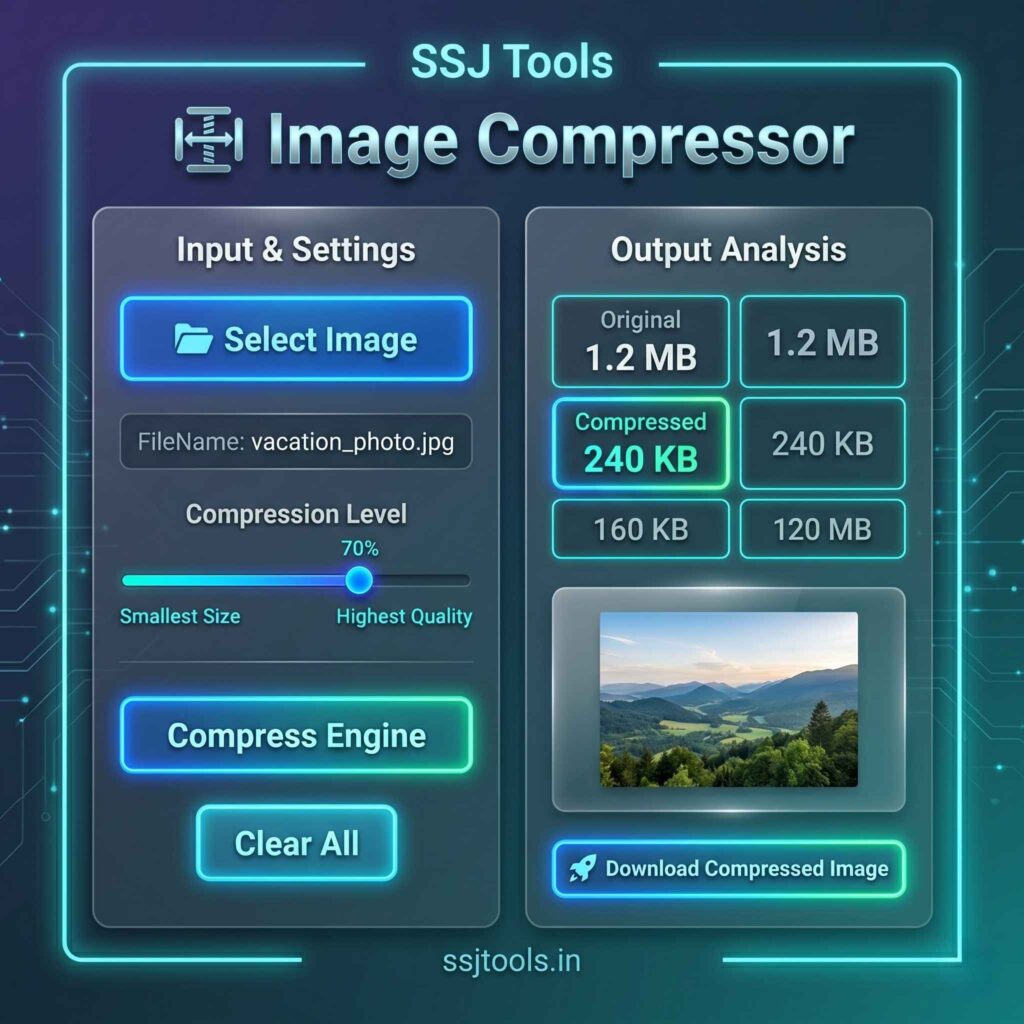
Real-time Process Stream: The built-in “Process Stream” terminal provides instant feedback. You’ll see a progress bar and status updates like “File loaded,” “Engine: Running optimization…,” and “Compression Successful.”
Instant Visual & Analytical Feedback: Once compressed, you’ll immediately see a before-and-after comparison. The ssj_stats_grid displays the precise “Original” size (in KB) versus the new “Compressed” size, highlighting the efficiency of the tool. A preview frame also shows the resulting image.
One-Click Secure Download: A prominent, secure image compressor download link is generated instantly, allowing you to save your quality image compressor output directly to your device as a standard JPEG (
SSJ_Compressed.jpg).Powered by the SSJ-V3 Engine: The entire compression process is driven by our proprietary, highly optimized SSJ-V3 engine, ensuring rapid, reliable, and high-quality results every time.
How to Use This Tool: Step-by-Step
Compressing images with SSJ Tools is incredibly straightforward, even for beginners. Here’s a quick guide based on our user-friendly interface:
Select Your Image: Click the large, clear “📁 Select Image” button in the “📥 Input & Settings” panel. Your computer’s file explorer will open, allowing you to choose your desired image file. The tool supports standard image formats (
image/*).Verify the File: Once selected, the “file-name-display” will show the name of your chosen file (or “No file detected” if none was chosen).
Adjust Compression Level: Use the horizontal slider under “Compression Level” to choose your desired balance. Slide left towards “Smallest Size” (lower percentage) for maximum reduction, or right towards “Highest Quality” (higher percentage) for minimal loss. The current percentage (e.g., “70%”) is displayed clearly.
Start Compression: When you’re ready, simply click the vibrant “Compress Engine” button. The terminal will spring to life, showing you the progress through the status log and progress bar.
Review the Results: Upon successful compression, the “Output Analysis” panel will populate. You’ll see the exact original and compressed file sizes side-by-side, along with a visual preview.
Download Your Optimized Image: Click the highlighted “🚀 Download Compressed Image” button to save your newly optimized photo.
Need to Compress More? If you have more images, just click the “Clear All” button to reset the entire engine and start fresh.
Why Choose This Online Image Compression Tool?
In a crowded field of online image compressors, SSJ Tools stands out for several key reasons:
Free & Accessible: We offer this high-performance file compressor photo tool completely free of charge. There’s no need to pay for expensive software or subscriptions.
No Software Download Required: Save valuable disk space and avoid potential security risks associated with downloading executable files. Our tool works entirely within your web browser.
Fast & Efficient: The SSJ-V3 engine is designed for speed. Your images are processed almost instantly, with clear progress indicators every step of the way.
User-Centric Design: From the intuitive slider to the clear before-and-after stats, every element is designed to make the compression process seamless and informative.
Prioritizes Security: While processing happens in your browser, we emphasize security and data privacy throughout the user experience.
Common Use Cases for the SSJ Tools Image Compressor
Who can benefit most from using an image size reducer online?
Web Developers & Designers: Critically reduce image file sizes to dramatically improve website load times and meet performance benchmarks like Google PageSpeed.
Bloggers & Content Creators: Optimizing images for blog posts is essential for both user experience and SEO.
E-commerce Store Owners: Fast-loading product images are crucial for high conversion rates. Compress product photos without losing details customers need to see.
Social Media Managers: Quickly reduce photo sizes to meet platform-specific upload limits, while still maintaining visual quality.
Photographers & Artists: When displaying portfolios online, balancing quality and file size is art in itself. Our adjustable compression level is perfect for this.
General Internet Users: Need to email a large photo or upload an image to a form? Effortlessly shrink it with our jpg photo reduce tool.
Crucial SEO Benefits of Using an Image Optimizer
The link between image optimization and SEO is direct and powerful:
Faster Page Speed: Google explicitly uses page load speed as a ranking factor for both desktop and mobile search results. Reducing image sizes is often the single most impactful way to boost speed.
Improved User Experience: Fast-loading pages lead to happier users, who stay longer on your site, browse more pages, and are less likely to bounce back to search results. All of these user signals indirectly benefit your SEO.
Optimized Mobile Performance: With mobile-first indexing, having lightweight, quickly loading pages on mobile devices is critical. Compressed images significantly improve the experience for mobile users, especially on slower networks.
Better Core Web Vitals: Images play a huge role in Core Web Vitals metrics like Largest Contentful Paint (LCP). Optimizing images helps improve these scores, further boosting your SEO potential.
Tips for Achieving the Best Compression Results
To get the absolute most out of our quality image compressor, keep these tips in mind:
Find Your Sweet Spot: Experiment with the compression slider. For most web applications, a level between 60% and 80% offers significant file size reduction with negligible visual impact. Only go lower if absolute minimum size is critical.
Consider the Image Type: The tool is highly optimized for JPEGs, which use lossy compression. For graphics with sharp lines or transparency, PNGs are often better, although our tool will still compress them.
Right-Size First: Before compressing, ensure your image is resized to the actual dimensions you’ll be displaying it at. Uploading a 4000px wide photo to display as a 400px wide thumbnail is extremely inefficient, even after compression.
Use Descriptive File Names: Before uploading, name your files with relevant, SEO-friendly keywords (e.g.,
best-running-shoes.jpginstead ofIMG_1234.jpg).
Frequently Asked Questions (FAQs)
Here are answers to some common questions about our online image compressor.
Q1: Will I lose noticeable image quality?
Our tool uses lossy compression online, which technically removes some data. However, at moderate compression levels (60-80%), the difference is usually invisible to the human eye, especially on web displays. You can always adjust the slider for your desired balance.
Q2: Is this tool free to use? Yes, our image compression tool free
is completely complimentary. There are no hidden costs or subscriptions required.
Q3: Can I compress large batches of images at once?
While our current interface is designed for one image at a time, you can quickly reset and process multiple photos. For bulk needs, we are exploring features for a potential bulk jpg compress or compress image bulk update.
Q4: Is my image data secure?
Absolutely. The compression process happens locally within your web browser. We do not upload your original images to our servers for processing. This makes it a highly secure image compressor.
Q5: What file formats are supported?
The tool works most effectively on JPEGs, but also supports a wide range of standard image formats (like PNGs and potentially some file compressor photo types). For more specific formats like WebP, stay tuned for future updates like a bulk webp image compressor.
Optimize Your Images and Boost Your Website’s Performance Today!
Don’t let slow-loading images drag down your website’s speed, user experience, and SEO. Empower your online presence with SSJ Tools’ free and powerful image optimizer. Experience the perfect blend of file size efficiency and professional clarity.
Try our online image compression tool now and see the difference it makes! For more helpful online utilities, explore the rest of our tools at SSJ Tools.